Learning network with simulation software packet treasure
Learning to make computer networks with packet tracer
Add the router and then settings on Config :
For FastEthernet0 / 0
Port Status = on
IP address = 192.168.0.1
Subnet Mask = 255.255.255.0
For FastEthernet0 / 1
Port Status = on
IP address = 192.168.1.1
Subnet Mask = 255.255.255.0
· Add 2 Units switch, the first switch conect to FastEthernet0 / 0 routers and 2nd switches to FastEthernet0 / 1 router with a straight connection.
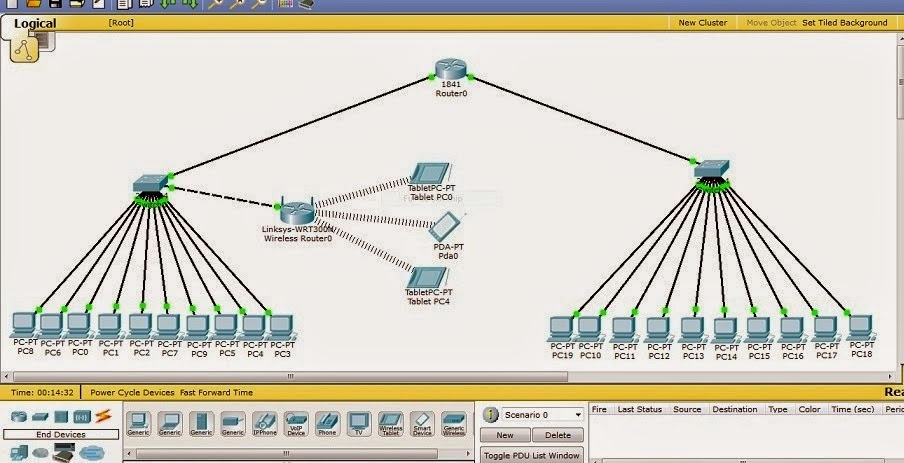
· Add 10 pc and 10 pc conect to the first switch with a straight connection, ip configuration settings as below:
ip configuration
Ip address = 192.168.0.2
Ask = 225.225.225.0 subnet
Default gateway = 192.168.0.1
For pc 2nd to 10th set as above but for his ip adrdres be 192.168.0.3 and so on.
· Add 10 pc and 10 pc conect to the second switch with a straight connection, ip configuration settings as below:
ip configuration = Static
Ip address = 192.168.1.2
Ask = 225.225.225.0 subnet
Default gateway = 192.168.1.1
For pc 2nd to 10th set as above but for his ip adrdres be 192.168.1.3 and so on.
· Add a wireless Linksys router - WRT300N and connect Ethernet switch to the first with cross connections and do some settings as below:
Internet settings in the config: type conection change becomes static and default gateway = 192.168.0.1
lan settings in the config: change ip address = 192.168.0.12 (ip after pc to 10) and the subnet mask = 255.255.255.0
change the dhcp server in the gui: enable the dhcp server and change the IP address = 192.168.0.100 start
- Add a few devices that support wireless connection it will automatically conected to the wireless router and its ip starts from 192.168.0.100 and so on.
-do a ping on each device to test.
Add the router and then settings on Config :
For FastEthernet0 / 0
Port Status = on
IP address = 192.168.0.1
Subnet Mask = 255.255.255.0
For FastEthernet0 / 1
Port Status = on
IP address = 192.168.1.1
Subnet Mask = 255.255.255.0
· Add 2 Units switch, the first switch conect to FastEthernet0 / 0 routers and 2nd switches to FastEthernet0 / 1 router with a straight connection.
· Add 10 pc and 10 pc conect to the first switch with a straight connection, ip configuration settings as below:
ip configuration
Ip address = 192.168.0.2
Ask = 225.225.225.0 subnet
Default gateway = 192.168.0.1
For pc 2nd to 10th set as above but for his ip adrdres be 192.168.0.3 and so on.
· Add 10 pc and 10 pc conect to the second switch with a straight connection, ip configuration settings as below:
ip configuration = Static
Ip address = 192.168.1.2
Ask = 225.225.225.0 subnet
Default gateway = 192.168.1.1
For pc 2nd to 10th set as above but for his ip adrdres be 192.168.1.3 and so on.
· Add a wireless Linksys router - WRT300N and connect Ethernet switch to the first with cross connections and do some settings as below:
Internet settings in the config: type conection change becomes static and default gateway = 192.168.0.1
lan settings in the config: change ip address = 192.168.0.12 (ip after pc to 10) and the subnet mask = 255.255.255.0
change the dhcp server in the gui: enable the dhcp server and change the IP address = 192.168.0.100 start
- Add a few devices that support wireless connection it will automatically conected to the wireless router and its ip starts from 192.168.0.100 and so on.
-do a ping on each device to test.